Dell UltraSharp U2723QE Review: The King of Connectivity?
In the modern workspace, the battle against desk clutter is constant. A tangle of power bricks, display cables, USB dongles, and network adapters can turn a clean, productive environment into a chaotic mess. The dream for many is a single-cable solution that connects everything. Dell aims to deliver on that dream with the UltraSharp U2723QE, a monitor that isn't just a display but a complete docking station designed to be the central hub of your entire setup. This review is for the productivity-focused professional, the multi-device power user, and the content creator who values a streamlined workflow, exceptional clarity, and versatile connectivity above all else.
(Disclosure: This article contains affiliate links. If you make a purchase through these links, we may earn a commission at no extra cost to you.)See the latest deals on the Dell U2723QE on Amazon
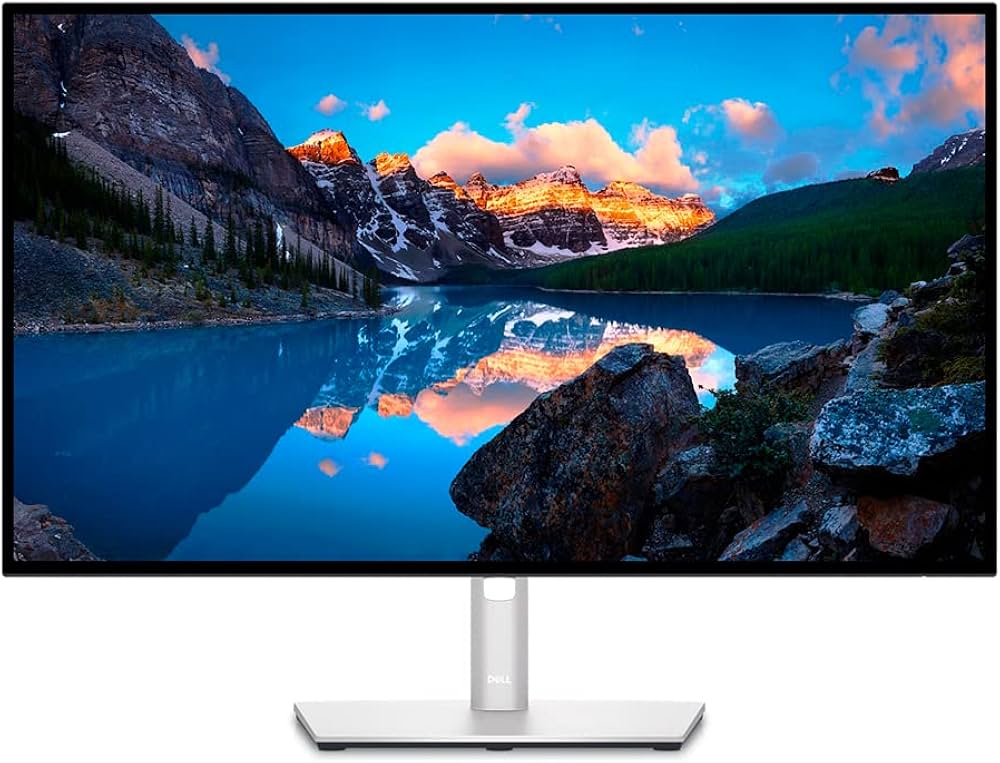
Who is the Dell U2723QE For?
The Dell U2723QE is engineered for a specific type of user: the laptop-centric professional who demands efficiency and a minimalist desk. If your workflow involves frequently connecting and disconnecting a laptop, this monitor is a game-changer. It's the ideal companion for hot-deskers who need to get up and running instantly, or for home office users who want to connect their work laptop and personal desktop to the same screen and peripherals without constantly swapping cables. Creatives who work primarily in the sRGB and DCI-P3 color spaces for video or general design will find its color performance more than adequate. In essence, this monitor is for anyone who sees their display not just as a window to their work, but as the very heart of their workstation, providing a single-cable solution for display, peripheral access, high-speed charging, and even a stable wired internet connection.
Deep Dive: Key Features & Specifications
The Productivity Powerhouse: KVM & USB-C Hub
The U2723QE's most compelling feature is its transformation from a simple monitor into an all-in-one workspace solution. At its core is a massive connectivity hub designed to eliminate the need for a separate docking station. The centerpiece is a USB-C port that provides a staggering 90W of Power Delivery, enough to charge even demanding laptops at full speed, all while transmitting the 4K video signal and connecting to the monitor's built-in peripherals. The port selection is extensive, featuring four USB-A 3.2 Gen 2 ports at the rear, another quick-access USB-A port with 15W charging on the bottom edge, and an additional downstream USB-C port also capable of 15W charging. This allows you to connect a keyboard, mouse, webcam, external hard drive, and charge your phone simultaneously. To complete the docking experience, Dell has included an RJ45 Ethernet port, providing a stable, wired network connection to your laptop through the single USB-C cable.
Further enhancing its productivity credentials is an integrated KVM (Keyboard, Video, Mouse) switch. This allows you to connect two separate computers to the monitor and control both using a single keyboard and mouse. Using the Dell Display Manager software, you can set up hotkeys to seamlessly switch between machines or use Picture-in-Picture (PiP) and Picture-by-Picture (PbP) modes to view both sources at once. This is incredibly useful for developers working on different operating systems or professionals who use both a work laptop and a personal desktop. A notable technical detail is the USB-C prioritization setting in the on-screen display. Users must choose between "High Resolution," which guarantees an uncompressed 4K 60Hz signal but limits the USB hub to slower USB 2.0 data speeds, or "High Data Speed," which enables full USB 3.2 transfers but may compress the video signal, potentially reducing resolution or refresh rate on older devices that lack Display Stream Compression (DSC).
A New Level of Contrast: IPS Black Technology
For years, a primary weakness of IPS (In-Plane Switching) panels has been their relatively low contrast ratio, typically around 1000:1, which can result in blacks appearing as dark gray, especially in dimly lit rooms. The Dell U2723QE addresses this head-on with the inclusion of LG's IPS Black technology. This panel innovation doubles the native contrast ratio to a measured 2000:1. This significant improvement delivers visibly deeper black levels and a richer, more dynamic image. While it still can't match the perfect blacks of an OLED display, the enhanced contrast makes a tangible difference in image quality, lending more depth and pop to both content and everyday applications.
This advanced panel technology is paired with a sharp 4K (3840 x 2160) resolution packed into a 27-inch screen. This results in a high pixel density of 168 pixels per inch (ppi), rendering text with exceptional clarity and images with fine detail, making it a pleasure to use for long hours of reading, coding, or examining high-resolution assets. The monitor also boasts a peak brightness of 400 nits, which is more than sufficient to combat glare in most well-lit office environments.
Excellent Color for Creators
The U2723QE is not just for office work; it's a highly capable display for content creation. It provides extensive color gamut coverage, reaching 100% of the sRGB space and an impressive 98% of the DCI-P3 gamut, which is the standard for digital cinema and increasingly used in video editing. Out of the box, its color accuracy is excellent, particularly in the dedicated sRGB mode, which achieves a professional-grade average Delta E of 0.33, meaning color error is virtually imperceptible to the human eye. This level of precision means many creators can use it for color-critical work without needing immediate calibration.
Its wide DCI-P3 coverage makes it a strong choice for video editors and digital designers. However, it's important to note its limitations for certain professional workflows. The monitor covers about 85-90% of the Adobe RGB color space. While this is good, it falls short of the near-100% coverage offered by specialized photography monitors. Therefore, professional photographers who work extensively in the Adobe RGB gamut for print production may find it insufficient for their most demanding proofing tasks.
Real-World Performance: A Day at the Desk
Office and Productivity Tasks
In a typical office setting, the U2723QE is an absolute champion. The combination of 4K resolution on a 27-inch panel provides an expansive and incredibly sharp canvas for multitasking. Text in documents and spreadsheets is razor-sharp, reducing eye strain over long periods. The true magic, however, is the single-cable setup. Plugging in one USB-C cable instantly connects a laptop to the 4K display, a full suite of peripherals, a wired internet connection, and 90W of charging power. This seamless experience declutters the desk and makes transitioning between work and personal use effortless. The monitor's stand is also a highlight, offering a full range of ergonomic adjustments including 150mm of height, generous tilt and swivel, and a full 90-degree pivot into portrait mode, ensuring any user can find a comfortable viewing position.
Content Creation
For content creators, the U2723QE is a strong performer with one significant caveat. When editing video or designing graphics in SDR, the monitor shines. The sharp 4K resolution allows for pixel-perfect work, and the accurate, vibrant colors within the sRGB and DCI-P3 gamuts ensure that content looks as intended. The high contrast from the IPS Black panel adds a pleasing depth to images that standard IPS monitors lack.
However, the monitor's HDR (High Dynamic Range) performance is disappointing and should not be considered a key selling point. While it can accept an HDR signal and is VESA DisplayHDR 400 certified, its capabilities are rudimentary. It uses a basic edge-lit local dimming system with only a handful of zones, which does little to enhance contrast in HDR scenes. Furthermore, its peak brightness is not high enough to produce the specular highlights that give HDR content its signature impact. Colors can appear washed out, and the overall experience fails to deliver the "wow" factor of a true HDR display. It is suitable for viewing HDR content casually, but not for professional HDR grading or mastering.
Pros and Cons: The Full Picture
The Dell U2723QE is a feature-packed monitor, but it's essential to weigh its strengths against its weaknesses. Its greatest advantage is undoubtedly its function as a comprehensive connectivity hub. The combination of a KVM switch, 90W USB-C Power Delivery, and an Ethernet port in a single package is a massive win for productivity and desk organization. The introduction of IPS Black technology provides a significant and welcome boost in contrast ratio over traditional IPS panels, resulting in a richer image. This is complemented by the tack-sharp 4K resolution and excellent ergonomics that allow for a comfortable setup in any environment.
On the other hand, this monitor is not for everyone. It is a poor choice for gaming, with a standard 60Hz refresh rate, slow pixel response times that lead to noticeable motion blur, and a lack of Variable Refresh Rate (VRR) support. As mentioned, its HDR performance is lackluster and should be considered a minor feature at best. The semi-glossy screen coating, while contributing to image clarity, can be more reflective than matte alternatives, which may be an issue in brightly lit rooms with direct light sources. Finally, while its color gamut is great for video and general use, the limited Adobe RGB coverage makes it a less-than-ideal choice for professional photographers who require precise print proofing.
How Does It Compare?
When considering alternatives, the target audience is key. For a professional photographer who prioritizes color space coverage for print work above all else, a monitor like the BenQ SW271C presents a compelling option. The BenQ is designed specifically for photographers, offering 99% coverage of the Adobe RGB color space and advanced hardware calibration features. However, it sacrifices the Dell's key advantages: it has a standard 1000:1 contrast ratio, lower 60W power delivery, and lacks the extensive KVM and hub features that make the U2723QE a productivity powerhouse. The choice is clear: the BenQ SW271C is for the color purist, while the Dell U2723QE is for the productivity-driven professional who needs a do-it-all hub.
The Verdict: Should You Buy the Dell U2723QE?
The Dell UltraSharp U2723QE is a masterclass in functional design. It understands its target audience perfectly and delivers a feature set that directly addresses the needs of a modern, flexible workspace. It is a productivity monster first and foremost. The combination of a beautiful, high-contrast 4K IPS Black panel with an unparalleled connectivity hub makes it one of the most versatile and powerful office monitors on the market. It streamlines workflows, eliminates clutter, and provides a superb visual experience for everything from spreadsheets to video editing.
If you are a laptop power user who craves a single-cable solution for your entire desk setup, the U2723QE is an outstanding investment. It is for the professional who values efficiency, clarity, and a clean workspace. However, if your primary use case is competitive gaming, professional HDR mastering, or color-critical photography for print, you should look at more specialized displays. For everyone else, the Dell U2723QE comes with our highest recommendation as the potential king of productivity monitors.
Streamline your desk setup today. Check the price for the Dell U2723QE on Amazon
Frequently Asked Questions (FAQ)
Is the Dell U2723QE good for gaming?No, the Dell U2723QE is not recommended for gaming. It has a low 60Hz refresh rate, a slow response time that causes motion blur in fast-paced games, and lacks support for adaptive sync technologies like FreeSync or G-SYNC. While casual gaming is possible, it is not designed for a serious gaming experience.
What is a KVM switch and why is it useful?A KVM (Keyboard, Video, Mouse) switch is a hardware device that allows you to control two or more computers from a single set of peripherals. The U2723QE has this feature built-in, meaning you can connect both a desktop and a laptop to the monitor and use the same keyboard and mouse for both, switching between them with a simple hotkey. This is extremely useful for users who manage multiple machines at their desk.
Can I daisy-chain a second monitor with the U2723QE?Yes, the Dell U2723QE supports daisy-chaining a second monitor. It has a DisplayPort (Out) port that supports Multi-Stream Transport (MST), allowing you to connect a second compatible monitor directly to the U2723QE instead of running another cable back to your computer, further simplifying cable management in a multi-monitor setup.